CDisplayEx Comic Reader
- 4.9
- Rating
- 100.00K
- Installs
- $5.99
- Price

 Analysis by App-foxy
I have always found that a comic reader succeeds or fails on small decisions: how quickly it opens a file, whether a page fits the screen properly, and whether reading feels calm instead of fiddly. CDisplayEx Comic Reader is built around that practical idea. It is a paid comics app for Android from Progdigy Software, aimed at people who already keep digital comic files and want a focused way to read them rather than a broader entertainment service. After using it as a dedicated reader, I came away impressed by its control and consistency, although it is not the best match for someone who expects a built-in comic shop or a heavily guided reading experience.
The app sits in the Comics category and costs $5.99. Its age rating is Everyone, which makes the software itself approachable for a wide range of readers, while the suitability of any particular comic still depends on the files you open. It has been available since Apr 15, 2018, and its reputation is unusually strong: a 4.9 average from around 9K ratings, with over 100K installs. Those figures do not replace hands-on use, but they do fit my impression that this is a mature tool with a clear purpose.
How I settled into a reliable reading workflow
My normal routine with a comic reader is simple. I keep my files organized, open the reader, choose a title, and start reading without having to pass through recommendations, accounts, or unrelated menus. CDisplayEx works well with that kind of habit because it treats the file itself as the center of the experience. I can concentrate on the page instead of navigating a storefront.
You May Also Like

 Blood Strike: 2.5 Anniversary
Blood Strike’s Loadouts Turn Every Drop Into a Tactical Gamble
A close look at Blood Strike’s custom loadouts: how fast access to signature weapons reshapes its battle royale rhythm, rewards preparation, and narrows the gap between fights.

 Pandora - Music & Podcasts
Pandora’s Music Is Easy to Start, but Harder to Recover
Pandora’s strength is its low-effort path from a seed to a station. Its weak spot is how much confidence it asks you to place in connection, setup, and quiet recovery.

 8 Ball Pool
 Is Built on Rivalries, Rematches, and Routine
A close look at the rivalries, rematches, shared routines, and unanswered safety questions that turn a quick pool match into a persistent mobile community.

 Samsung Music
’s Quiet Strength Is Playing What You Already Own
Its reach comes less from spectacle than from dependable access to a personal library. That simplicity is both the app’s strongest retention engine and its ceiling.

 AccuWeather: Weather Radar
AccuWeather Review: A Quick, Clear Forecast for Everyday Decisions
For everyday plans, the best forecast is the one you can understand quickly. AccuWeather makes rain timing, radar, and local conditions easy to act on, with a few trade-offs.

 Hill Climb Racing
Why Hill Climb Racing Still Turns Crashes Into One More Run
A tiny car, a bumpy hill and one more upgrade: Hill Climb Racing keeps resurfacing because its simple chaos makes every near-miss feel personal.
More From Our News Desk



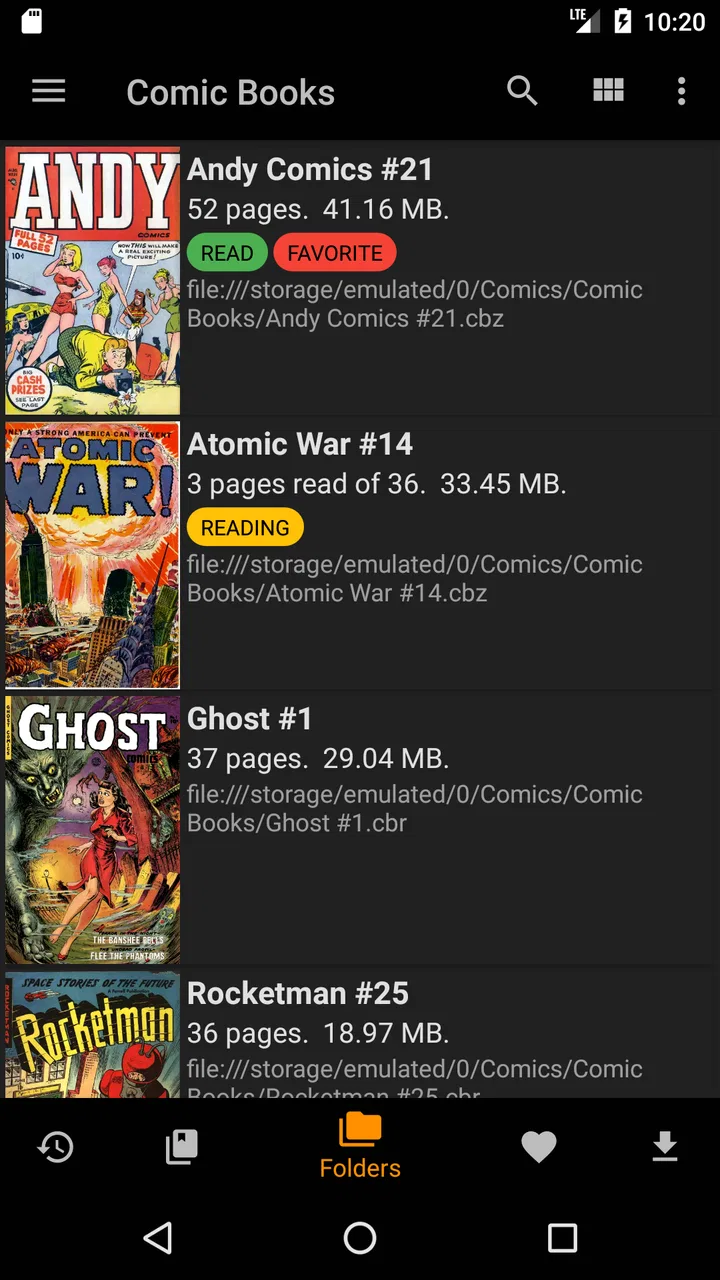
That makes it particularly useful for readers who have collected digital comics over time. If your library is spread across folders on a device, the first useful step is not changing every option. It is creating a structure you can understand at a glance: one folder for unfinished books, another for completed titles, and separate areas for series or publishers if that suits your collection. The app becomes much easier to live with when the file organization outside the reader is tidy.
I also recommend testing one short comic before importing a large collection. This gives you a quick way to decide whether the default page behavior feels right on your phone or tablet. A page that looks comfortable on a large display may feel too small on a phone, while an aggressive zoom can make a two-page spread awkward. Spending a few minutes with a representative file is more useful than changing settings blindly.
The basic reading experience is strongest when I let the artwork determine the pace. I move through pages normally, pause when a panel needs more attention, and use zoom only when lettering or fine detail demands it. That sounds obvious, but it is an important distinction: the app is not trying to turn every comic into a guided animation. It gives me a viewing surface, and I decide how to read.
For a realistic everyday example, imagine reading during a commute with a phone. I would place the current series in an easy-to-find folder, open the next file, adjust the page to a comfortable size, and keep the phone in a consistent orientation. When I reach the end, I would close the book and return later rather than relying on memory. This routine avoids the most common source of friction with local comic readers: losing track of which file comes next.
On a tablet, my approach changes slightly. I prefer to inspect a full page first, because the larger screen can preserve more of the original layout. If the lettering is still too small, I zoom for individual panels rather than staying magnified all the time. That preserves the relationship between panels and prevents the story from becoming a sequence of disconnected close-ups.
The first settings I would check
I would not begin by adjusting everything. The most valuable first checks are the options that affect page fit, orientation, and the way the reader responds to taps or swipes. These choices determine whether the app feels natural in your hands. If page transitions seem too sensitive, or if the display keeps rotating when you do not want it to, fixing those points early makes the rest of the experience feel much more polished.
Fit behavior deserves special attention because comics are not all designed the same way. A standard single-page issue, a wide spread, and a scan with large borders each need a slightly different approach. I find that automatic fitting is a good starting point, but it should not be treated as a permanent answer. When a page contains small dialogue, a manual zoom can be more comfortable; when the artwork depends on a complete composition, backing out to the full page is better.
Touch controls are another area where experienced use pays off. I like to make sure the gesture or tap pattern for moving forward is predictable before settling into a long reading session. The goal is not to memorize every possible command. It is to establish one reliable action for advancing and one for going back, then avoid accidental touches near the edges of the screen.
The best setup is the one that removes decisions while you read. I would rather have a modest set of familiar controls than a complicated arrangement that looks powerful but makes me think about the interface on every page. This is especially important when reading in bed or while traveling, where repeated small adjustments become irritating quickly.
Brightness is worth considering as part of the reading environment, even though it is not a substitute for a comfortable room. A bright screen can make dark artwork look washed out, while a dim screen may hide line work. I usually set the device brightness first, then judge the comic inside the app. That gives me a more realistic sense of whether the page is the problem or the surrounding lighting.
I also pay attention to how the reader behaves with different file types and page layouts rather than assuming one title represents the whole collection. A clean digital release may need almost no intervention. A scanned book with uneven margins can benefit from more hands-on fitting. This is one reason I would keep a small test selection available: it lets me check a setting against a real variety of material.
Small habits that make long sessions faster
Once the basic setup is comfortable, speed comes from repeatable patterns rather than constant tweaking. I open the reader with a clear idea of what I want to read, keep related files together, and avoid rebuilding my library every time. That sounds less exciting than discovering a new feature, but it has a bigger effect on everyday use.
One useful habit is to separate “currently reading” from the rest of the collection. I do not need a complicated catalog for this. A simple folder or naming pattern is enough to prevent the familiar problem of opening several books before finding the one I meant to continue. CDisplayEx benefits from this approach because its strength is direct access to your files, not persuading you what to read next.
I also try to finish a session at a natural stopping point. If I stop halfway through a page, I am more likely to forget where I was, particularly when several books are open in rotation. Ending after a page or chapter gives the next session a cleaner start. This is a personal reading habit, but the app’s focused design makes it easy to follow.
For large collections, consistent filenames matter more than people expect. Putting the series name and issue order in a predictable format reduces hunting and makes sorting more useful. I would avoid relying only on cover images or memory, especially if several files have similar names. A reader can display a book well, but it cannot compensate for a chaotic archive.
Another practical pattern is to use a full-page view for orientation and a closer view for lettering. I first look at the whole page to understand the composition, then zoom into the area I need. This is faster than staying zoomed in and repeatedly dragging around, and it respects the way many comics guide the eye across a page.
On a phone, I would also keep sessions shorter when the lettering requires frequent zooming. That is not a failure of the app; it is a sign that the screen size may not suit that particular edition. If a title consistently feels cramped, a tablet or larger display is a better solution than endlessly changing controls. CDisplayEx gives me the flexibility to adapt, but it cannot create screen space that the device does not have.
People who read in different places may want two distinct routines. At home, a tablet and full-page reading can preserve the artwork. Away from home, a phone and a simpler forward-back rhythm can be more practical. Trying to force one setup to serve both situations often creates unnecessary friction. I prefer to treat the device and environment as part of the reading method.
Where the app is especially strong
The clearest advantage is focus. CDisplayEx is not trying to be a comic marketplace, a social network, or a general media hub. For me, that means less visual noise between opening a file and reading it. Someone with a well-established collection will appreciate that directness more than someone who wants recommendations or a subscription library.
It is also a good fit for readers who care about presentation. Comics depend on page composition, panel spacing, lettering, and visual rhythm. A reader that lets me move between full-page context and detailed inspection is more useful than one that always forces a single presentation style. The right choice still depends on the source file, but the app gives me room to respond to those differences.
The price also changes how I judge it. At $5.99, I expect a tool I can use repeatedly, not a disposable viewer. That makes the purchase easier to justify for someone with a substantial digital collection, especially if they read often. For a person who opens a comic only occasionally, a free alternative may be adequate, and paying for a dedicated reader may not feel necessary.
The developer, Progdigy Software, has kept the identity of the product clear: this is a reader first. I value that clarity because it makes the app easier to evaluate. I am not buying it for extras that distract from the main job. I am buying it because I want my own comics to be comfortable to read.
Limits that should shape your decision
The same focus that I like can feel restrictive to another reader. If you want to browse a large commercial catalog, purchase issues inside the app, or receive personalized suggestions, this is not the obvious choice. A dedicated store or subscription service will usually provide a smoother path from discovery to reading. CDisplayEx makes more sense after you already have the material.
Local-file reading also places responsibility on the user. You need to know where your comics are stored, how they are named, and how you want to organize them. That is manageable for a careful collection, but it can be frustrating if you expect the app to automatically turn a messy archive into a perfect library. My advice is to clean up the collection gradually instead of attempting a huge reorganization before reading anything.
Screen size is another genuine limitation. The app can help you fit and enlarge pages, but a phone remains a phone. Wide spreads, dense layouts, and small lettering may still require repeated zooming. Readers who mainly use a small handset and dislike panning across pages may prefer an alternative designed around panel-by-panel presentation, even if that loses some of the original page design.
There is also a trade-off between control and simplicity. The more carefully you tune page behavior and touch actions, the more comfortable the experience can become. But if you want to install an app and never think about settings, a simpler reader may feel friendlier. I see CDisplayEx as a tool that rewards a little setup rather than one that hides every decision.
Finally, the age rating describes the app, not the collection. Because the reader is rated Everyone, it is broadly accessible as software, but parents and readers still need to consider the content of individual comic files. That distinction is easy to overlook when an app handles many kinds of material.
Who should use it and who should look elsewhere
I would recommend it to someone who owns digital comics, prefers reading without a storefront, and is willing to spend a few minutes making the controls fit their habits. It is especially appealing to collectors, manga and comic readers with varied page layouts, and anyone who wants a dedicated tool instead of an all-in-one service.
I would be more cautious about recommending it to a reader whose main goal is discovery. If your ideal evening begins with browsing new releases, following recommendations, and keeping a subscription library synchronized, another category of app will probably serve you better. The same applies if you strongly prefer automatic panel navigation and dislike manual page adjustment.
For occasional reading, the decision is closer. The paid price is reasonable for a tool that becomes part of a regular routine, but occasional users may not notice enough difference from a basic viewer. In my experience, the value appears after repeated sessions, when familiar settings and organized files save time.
My verdict after building a repeatable setup
CDisplayEx Comic Reader works because it respects the act of reading. I can organize my own files, establish comfortable page behavior, and move through a book without being pushed toward unrelated features. Its strongest qualities appear gradually: a sensible archive, a few well-chosen settings, and habits that reduce the need to search or adjust during every session.
I would not call it the universal answer for comics. Readers who want a store, subscriptions, recommendations, or automatic panel-by-panel guidance may be happier elsewhere. The app also asks more from people who have untidy collections or small screens. Those are real trade-offs, not defects to ignore.
For my own use, though, the balance is convincing. The high user rating feels understandable, and the focused design suits anyone who treats digital comics as a personal library rather than a streaming catalog. If that describes you, the $5.99 purchase is easy to defend: it turns a collection you already own into a more dependable daily reading habit. I would start with one representative comic, adjust the page and touch behavior, organize the next few files clearly, and then judge the app after several real reading sessions rather than after a single quick launch.
FAQs for CDisplayEx Comic Reader
01What is CDisplayEx Comic Reader used for?
CDisplayEx Comic Reader is designed for reading digital comics, manga, and graphic novels on mobile devices. It supports common comic-book formats such as CBZ, CBR, PDF, and image files, depending on the platform and version. Its interface focuses on comfortable page navigation, zooming, and organizing your personal comic collection for offline reading.
02Which comic and ebook file formats does CDisplayEx support?
The app is mainly known for supporting comic archive formats, including CBZ and CBR, as well as PDF and standard image files in many installations. Compatibility can vary between Android and iOS versions, and some archives may fail if they are damaged, encrypted, or use unusual compression methods. Checking the store description for your device is recommended before downloading.
03Can I read comics offline with CDisplayEx Comic Reader?
Yes, CDisplayEx is suitable for offline reading once your comic files have been imported or downloaded to the device. This is useful when traveling or reading without mobile data. You may still need internet access for cloud transfers, online file management, advertisements, updates, or optional synchronization features, depending on the version and settings installed.
04Does CDisplayEx provide features for comfortable manga and comic reading?
CDisplayEx includes practical reading controls such as page-by-page navigation, zooming, screen rotation, and support for different viewing layouts. Manga readers may benefit from right-to-left reading options when available. The experience can differ according to file quality and screen size, so very large pages or poorly scanned comics may require frequent zoom adjustments.
05Is CDisplayEx Comic Reader free, and does it contain advertisements or optional purchases?
CDisplayEx availability and pricing can differ between Android and iOS, and the developer may offer separate free and paid versions or optional upgrades. The free edition may include advertisements or fewer features, while a premium option can provide a cleaner reading experience. Review the current store listing carefully for advertising, in-app purchases, permissions, and subscription details before installing.
Pros
- Supports many comic formats
- including CBZ
- CBR
- and image folders.
- Fast page rendering keeps navigation smooth
- even in large comic archives.
- Offers customizable reading modes
- zoom controls
- and page transition options.
- Includes library organization tools for sorting and browsing your collection.
- Available on Android with a familiar interface for regular comic readers.
Cons
- Some advanced features may require the paid version or in-app purchase.
- The interface feels dated compared with newer comic reader applications.
- Large collections can take time to scan and generate cover thumbnails.
- PDF and comic layouts may occasionally need manual zoom adjustment.
- Ads in the free version can interrupt the reading experience.

CDisplayEx Comic Reader
Gallery